
Useful materials
Wi-Fi QR codes: connect guests without typing the password
A Wi-Fi code does not open a page — it hands the phone the network name and password, so the guest never spells either one out loud.
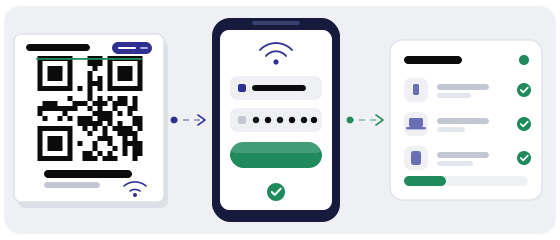
Not sure about a code? The scanner shows the address before it opens.
Check a codeA Wi-Fi QR is not a link
A link code carries a URL. A Wi-Fi code carries a configuration: the phone reads the network name, the password and the encryption type, then joins the network on its own. No browser, no page load, nothing to wait for.
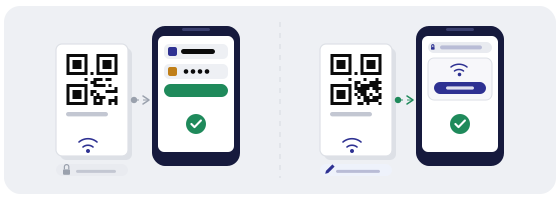
That matters because of the order of events. The guest has no internet yet — that is exactly why they are scanning. A web page would be useless here, so the payload has to work offline.
The same design is the weak spot. Nothing in that picture can be edited from a dashboard later: everything the phone needs is already baked into the printed image.
What is actually inside the code
Four values, and the phone only needs to misread one of them to fail.
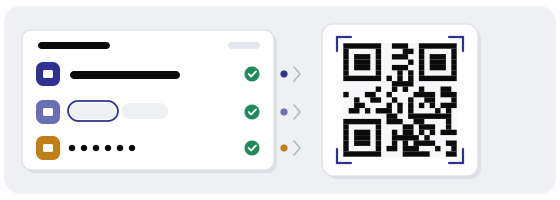
The network name exactly as it is broadcast, capitals included. The password. The encryption type — WPA, WPA2 and WPA3 all report as WPA in this format, while an open network reports as nopass. And a flag for hidden networks.
Most codes fail on the network name
Not on the design. On a trailing space in the SSID, a lowercase letter where the router broadcasts a capital, or a router renamed last year while the old card stayed in the drawer.
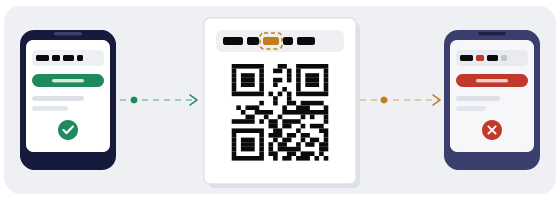
The dual-band trap is the common one. Plenty of routers broadcast Cafe and Cafe_5G as two separate networks. The code points at one, the guest sits closer to the other, and the phone reports a join error on a code that looks perfectly fine.
There is no clever fix here: open the network list on the phone once, read the name off the screen and copy it. Not from memory, and not from the invoice.
Where a Wi-Fi code earns its keep
One pattern behind all four: the code sits where the question appears. A code by the entrance does nothing for a guest who is already at table nine.
Three questions your staff answers every day
“Is the network called Cafe Guest or just Cafe?”
“Is that a capital C?”
“Is the last character a one or a lowercase L?”
Each of those costs a minute of staff attention, and each of them comes back with the next guest. A code answers all three before the question is asked, in any language, at three in the morning.
The day the password changes
This is the real decision, and it is not about design.
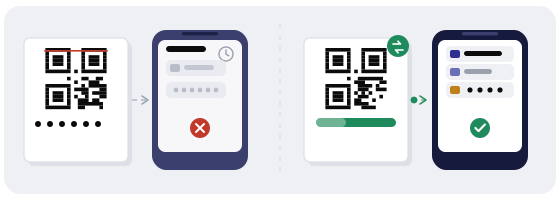
Password as plain text
Works for years and survives a password change — but every guest reads it out loud, photographs the card, and nobody can tell you whether anyone ever used it.
Static Wi-Fi QR
One scan and the phone is online, with no page in between. The code dies the moment you rotate the password, and reprinting is the only update you get.
Dynamic QR to a join page
Password and destination change from the dashboard, and you see the scans. The trade-off is honest: the guest lands on a page and taps once instead of joining instantly.
For a flat rented twice a month the static code is fine — print ten cards and replace them when you change the router. For a space with heavy turnover, or a password you rotate on purpose, the join page ages better.
Guest network, not your office network
The code in the lobby is a password in the lobby. Anyone who walks in, photographs it and walks out keeps access.
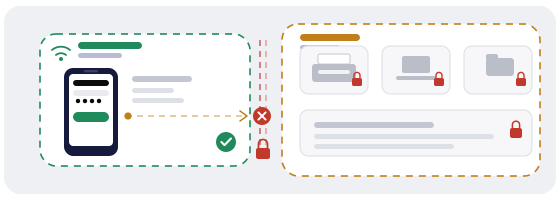
So the network behind that code should be a separate SSID with client isolation and a bandwidth cap — not the one that reaches the printer, the till and the file server.
Print rules that decide whether it scans
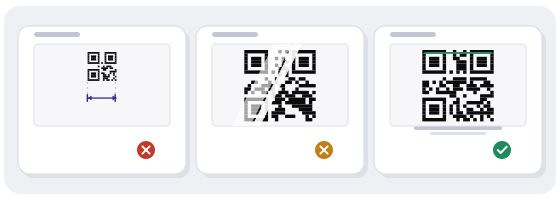
- At least two centimetres per side on a card people hold, five to eight on a wall.
- Matte, not glossy — a glossy code under a ceiling light throws glare straight into the camera.
- Dark modules on a light background. Inverted codes fail on a fair number of phones.
- Keep the empty margin around the code clear. Decorative borders are the usual culprit.
- Test with three phones: an iPhone, a recent Android and a five-year-old Android.
How to build it in practice
The QR generator has a Wi-Fi type: pick it, paste the network name and password, choose the encryption, then download an SVG for print or a PNG for screens.
The QR Studio is where the code gets styled — colour, logo, ready templates. One honest caveat: a logo in the middle covers data modules, and only high error correction gives the code room to lose them. Test the styled version instead of assuming it works.
Then run the QR scanner on the first printed proof. It decodes the payload and shows the network name and the password back to you in plain text, so you can compare them character by character against the router settings — before printing two hundred cards, not after.
Finally, scan the printed card from the actual table, in the actual light, with the phone a guest would be holding. A code that scans on your desk at noon proves nothing.
Mistakes that waste the code
- The marketing name in the code, the broadcast name on the router.
- The password retyped by hand instead of pasted.
- A laminated card that reflects the ceiling lights.
- The code placed above eye level or behind a chair.
- One code for two bands, when the bands have different names.
- The guest SSID is the same one that unlocks the smart TV and the printer.